



You’ve spent days perfecting a layout, every pixel exactly where it should be — then someone opens it in a different browser and it falls apart. Padding shifts. Fonts render differently. A subtle shadow vanishes. Welcome to cross-browser UI development, where visual consistency is a moving target.
This is why designers have started integrating MacBook mockup visuals into their browser compatibility workflows — not just as presentation eye candy, but as a genuine comparison tool that exposes rendering inconsistencies raw screenshots tend to obscure.
Why Browser Differences Still Matter
Blink (Chrome, Edge), Gecko (Firefox), and WebKit (Safari) interpret CSS in subtly different ways. Subpixel rendering, font smoothing, flexbox gaps, scroll behavior — each engine leaves its fingerprint on your UI. The challenge isn’t purely technical. It’s visual. When communicating these differences to stakeholders, the gap between “looks fine to me” and “this is broken” can be enormous.
How MacBook Mockups Build a Comparison Framework
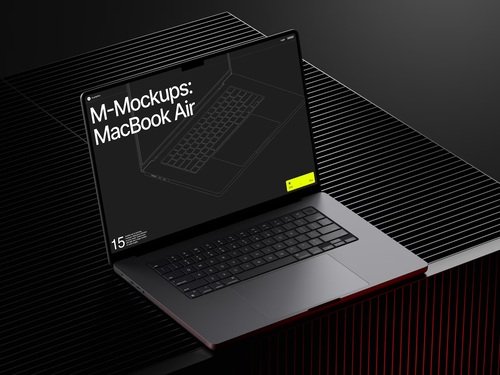
A MacBook mockup isn’t just a presentation prop — it’s a controlled visual context. When you place two browser screenshots inside identical device frames, you eliminate ambient noise: varying desktop backgrounds, OS chrome differences, inconsistent zoom levels. What remains is a clean comparison where even subtle rendering differences become immediately obvious.
Structure effective cross-browser comparisons like this:
- Side-by-side placement: Two MacBook frames at the same angle and color — one showing Chrome, one showing Safari. Matching frames draw the eye to content differences, not the containers holding them.
- Angle variation: Front-facing frames for static layout comparison; slight perspective angles to showcase hover states or animation frames captured mid-interaction.
This transforms a dry QA report into a visual document non-technical stakeholders can actually engage with.
Real Examples of MacBook Mockups in Action
Typography rendering audits. WebKit and Gecko handle font antialiasing differently on non-retina displays. Placing screenshots of identical text inside matching device frames makes the difference undeniable — essential when presenting findings to clients who need to grasp why a font crisp in Chrome feels heavier in Safari.
Component behavior documentation. Instead of attaching raw screenshots to a bug ticket, a designer creates a three-panel composition — three MacBooks, each showing a different engine’s interpretation of the same dropdown at the same interaction state. Context in one glance.
Client-facing browser support reports. When a product team decides which browsers to support, visual evidence matters more than spec sheets. Mockup-based comparisons give decision-makers something to see and react to — not just process as abstract data.
MacBook Mockups on ls.graphics: Quality Built for Professional Work
If you’re using device mockups professionally, quality matters. Cheap mockups introduce visual noise that undermines the credibility of your comparisons.
The MacBook mockup collections on ls.graphics represent a genuinely different standard. These aren’t flat, baked-in-shadow files from a generic asset site — they’re resources designers return to because they behave like professional tools.
What makes them stand out:
- Ultra-realistic rendering with physically accurate reflections and materials
- Organized, editable layers so swapping a browser screenshot takes seconds — critical when iterating across multiple browser variants
- Multiple angles and color styles — Silver, Space Gray, and more — that match your presentation’s visual language
- Stylish, minimalistic compositions that elevate screenshots to finished visuals without extra effort
- Easy to use in Figma or Photoshop — drop in your screenshot, pick a finish, export
Conclusion
Cross-browser UI comparison is part technical discipline, part visual communication — and the tools you use for the communication side matter more than most designers admit. A well-chosen MacBook mockup isn’t decoration. It’s a clarity tool that collapses the distance between a developer’s bug report and a stakeholder’s understanding.
The most effective browser comparison documents make differences undeniable at a glance. That requires good screenshots — but also device frames that carry real visual weight. That’s the standard ls.graphics delivers, and why their mockup library has become a fixture in design workflows that take cross-browser quality seriously.